Find Object
After the XML document has passed through the HCMDocLinkCleanup routine, it is consumed by HCMDocLink.FindObject to locate the Object Type and Object ID that identify the entity to which the document will be attached.
For this to happen, there must be a tag in the XML document that identifies OBJECT_TYPE. If there is an OBJECT_ID tag, it will use it. Otherwise, the FindObject function will use other TAGs in the XML document to locate a unique OBJECT_ID and insert it into the XML document as a new tag.
Supported Tags
The following table includes the list of TAGs that have special meaning to FindObject. You can include custom tag values and use them in the cleanup routine to find information to populate the important known tags.
| Tag Name | Additional Details |
|---|---|
| OBJECT_TYPE |
Required. Identifies which type of entity the document should be attached. Use the single-character code to identify the thing type, or use one of the following special values:
|
| OBJECT_ID | Identifies the entity to which the document should be attached. Use the unique identifier based on thing type. |
| OBJECT_USE | Text describing the usage for the document. This information is displayed as the Use field in CLS. |
| ADDR_SEQ | Identifies the intended recipient of the document, if applicable. Set to the unique contact identifier from ADDRESSES.ADDR_SEQ. |
| REPORT_TYPE |
Indicates the type of document. This tag is used to populate document setting 3 and includes the following valid values:
|
| USABLE |
Indicates whether the document is usable. This tag is used to populate document setting 1 and includes the following valid values:
|
| PROJECT_SEQ | Used when OBJECT_TYPE tag is "WORKORDER" to identify the unique, internal identifier for the workorder using PROJECTS.PROJECT_SEQ. |
| HSN |
Used when OBJECT_TYPE tag is "SAMPLE" to identify the unique, internal identifier for the sample using SAMPLES.HSN. When OBJECT_TYPE tag is "SCHEDULE", used with QUEUE and BATCH_NUMBER to identify the task using BATCH_SCHEDULES.SCHEDULE_SEQ. |
| LAB_SAMPLE_ID | Used when OBJECT_TYPE tag is "SAMPLE" to identify the sample using the laboratory identifier from PERMANENT_IDS.LAB_SAMPLE_ID. |
| SCHEDULE_SEQ | Used when OBJECT_TYPE tag is "SCHEDULE" to identify the unique, internal identifier for the task using SCHEDULES.SCHEDULE_SEQ. |
| QUEUE |
When OBJECT_TYPE tag is "SCHEDULE", used with HSN and BATCH_NUMBER to identify the task using BATCH_SCHEDULES.SCHEDULE_SEQ. When OBJECT_TYPE tag is "BATCH", used with BATCH_NUMBER to identify the batch using BATCHES.BATCH_SEQ. |
| BATCH_NUMBER |
When OBJECT_TYPE tag is "SCHEDULE", used with HSN and QUEUE to identify the task using BATCH_SCHEDULES.SCHEDULE_SEQ. When OBJECT_TYPE tag is "BATCH", used with QUEUE to identify the batch using BATCHES.BATCH_SEQ. |
| BATCH_SEQ | Used when OBJECT_TYPE tag is "BATCH" to identify the unique, internal identifier for the batch using BATCHES.BATCH_SEQ. |
| PATIENT_SEQ | Used when OBJECT_TYPE tag is "PATIENT" to identify the unique, internal identifier for the patient using PATIENTS.PATIENT_SEQ. |
| CUST_SEQ | Used when OBJECT_TYPE tag is "CLIENT" to identify the unique, internal identifier for the client using CUSTOMERS.CUST_SEQ. |
| STANDARD_SEQ | Used when OBJECT_TYPE tag is "STANDARD" to identify the unique, internal identifier for the standard using STANDARDS.STANDARD_SEQ. |
| DOCUMENT_SEQ | Used when OBJECT_TYPE tag is "DOCUMENT" to identify the unique, internal identifier for the chain of custody using DOCUMENTS.DOCUMENT_SEQ. |

Examples
Example 1
In this example, the properties file identifies the object type and object ID directly. The following example tells CLS Document Service to link files in the sample sub-folder to the sample identified by HSN 123456.
MySample = MyHznDocs\\sample
MySample.object_type = "SAMPLE"
MySample.object_id = "123456"
Example 2
In this example, the properties file identifies the object type and provides a hint so that FindObject can locate the unique object ID. The following example tells CLS Document Service to link files in the sample sub-folder to the sample identified by lab ID L123456.
MySample = MyHznDocs\\sample
MySample.object_type = "SAMPLE"
MySample.lab_sample_id = "L123456"
Example 3
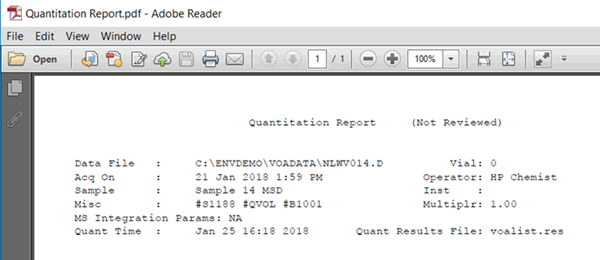
In this example, the properties file identifies the object type and uses file parsing to pull information from the PDF contents of the file, then the cleanup routine uses the parsed information to identify the object ID.
InstrumentRuns = MyHznDocs\\instrument runs
InstrumentRuns.object_type = "SCHEDULE"
InstrumentRuns.MiscInfo = Misc
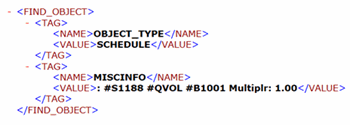
Cleanup script applied to XML Document:
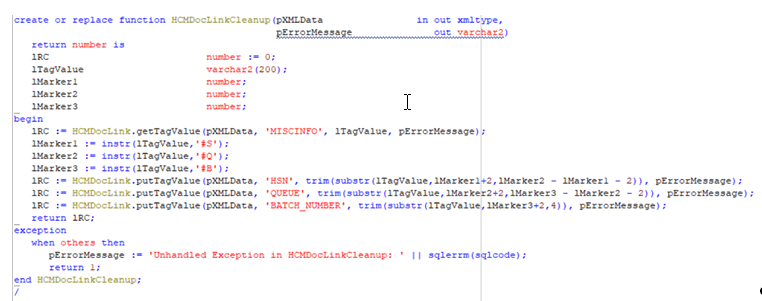
The XML Document after being passed through the cleanup script:
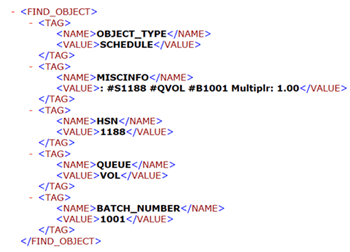
FindObject will use the tags from the XML document to locate the object ID, in this case a task for the sample and batch identified in the document. FindObject will insert OBJECT_ID as a TAG back into the XML document along with a STATUS value to indicate success (or failure).
See also: