Parsing PDF Files
CLS Document Service is an executable that can be used to automate the process of uploading documents and associating them with the appropriate samples, workorders, etc., in CLS Document. CLS Document Service can extract text from PDF files and use it to determine the entity to which the document will be attached. The text is extracted from the PDF file by looking for the search text identified in CLS_document_service.properties and returning everything on the current line that follows the found text.
Note: While CLS Document stores files of any type, only PDF files can be parsed.
See: Using CLS Document Service for more information about the CLS_document_service.properties file and the CLS Document Service utility.
 Searching
for Text
Searching
for Text
To parse PDF content, examine several examples of the types of documents you want to parse and look for patterns that contain useful identifying information. For example, the following instrument data report includes several header fields that have important information. "Operator" can be mapped to an analyst, "Quant Time" is the run date/time, and "Misc" includes a Lab ID Your laboratory's primary identifier for a sample, in the format you prefer or coinciding with the HSN..
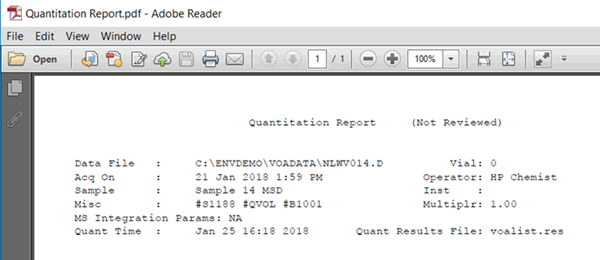
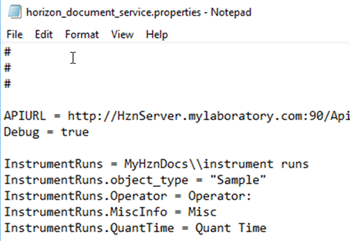
The following CLS_document_service.properties file includes the instructions to search for “Operator:”, “Misc”, and “Quant Time”. Since there is no white space between the "Operator" label and the colon that follows it, you can include the colon in the search text. The "Misc" and "Quant Time" text have unknown tab or space characters following, so you will have to trim the extraneous information from these variables later using the cleanup routine.
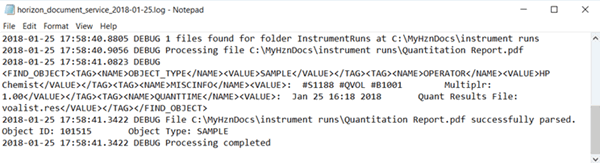
The following information is found in the log.
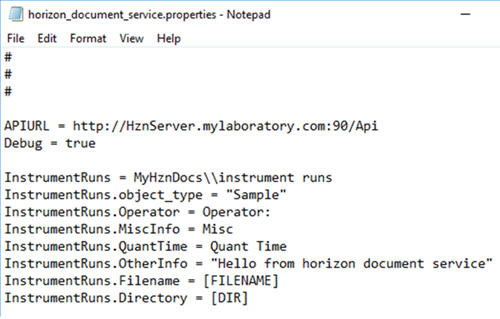
In addition to file content, the CLS_document_service.properties file can be used to pass other information to the PL/SQL FindObject function. The object_type and OtherInfo content variables in the example below contains hard-coded strings. Filename and Directory content variables contain dynamic information based on the file and folder being processed. The cleanup routine has access to all of this information to help identify the unique CLS entity to which the document should be attached.
See also: